

You must learn how to do a CMA in real estate, because one of the most important parts of your job is pricing homes accurately, for both buyer and seller clients. Buyers need to know how much a home is worth before they make an offer. Sellers need to know how much a home is worth before listing it for sale.
This article is intended to be used when pricing a home for buyer clients, but it can also be used to create a basic CMA for seller clients.
What is a Comparative Market Analysis
A CMA (Comparative Market Analysis or Competitive Market Analysis) is how real estate agents determine a home’s current market value. It’s a method of doing market research to determine what List Price to set on a home that is for sale. At a minimum, it takes into consideration the prices that similar homes in the same area, have sold for in the past 6 to 12 months. But it should also include a general market analysis showing what’s going on in the surrounding market.
An accurate CMA is important for home buyers, because most home buyers need a home loan/mortgage to purchase a property…and the home must appraise for its sale price (or the buyer may have to pay the difference between sales price and appraised value at Closing).
There are various online CMA tools such as Cloud CMA (possibly available with your MLS) and RPR® (Realtors Property Resource). However, they DO NOT make the necessary adjustments for the value-added differences in home features and amenities (like appraisers do), such as:
- Swimming pools
- Finished basements
- 3-car vs. 2-car garages
- Water or mountain views
- etc.
And they DO NOT adjust for detrimental items that affect a home’s value, such as being located on a very busy street, next to a noisy business, or adjacent to large power lines.
Without making the proper adjustments, your CMA value will not be accurate.
This is why you should use a spreadsheet that makes automatic adjustments.
How to Choose Comparables for a CMA
Use the How to Create a Basic CMA for Home Buyers worksheet as you create a basic CMA for buyer clients. Since this is the basic process for doing a CMA for a home buyer, the house you are doing a CMA for is probably Active on the market. So you should be able to print the MLS listing sheet to get the house details (size, bedrooms, etc.).
If you are doing a preliminary CMA for a home seller (before your listing appointment), you can either look at old MLS listing for the house, or pull up the tax info, to get the house details.
The overall goal is to find the best 5 Comparable homes (Comps) to use for your CMA analysis. Depending on the area and market, you may have too many or too few listings to choose from. Change the variables until you find the best 3-5 comparable homes to use for your CMA.
◼ To create a Basic CMA:
- Log onto your MLS system and go to the right type of Search (single family, condo, farm and ranch, etc.) that you need to use. If you don’t have the MLS printout for the subject property, then find it and print it out.
- Fill in the stats for the house you are “comping” in the table below.
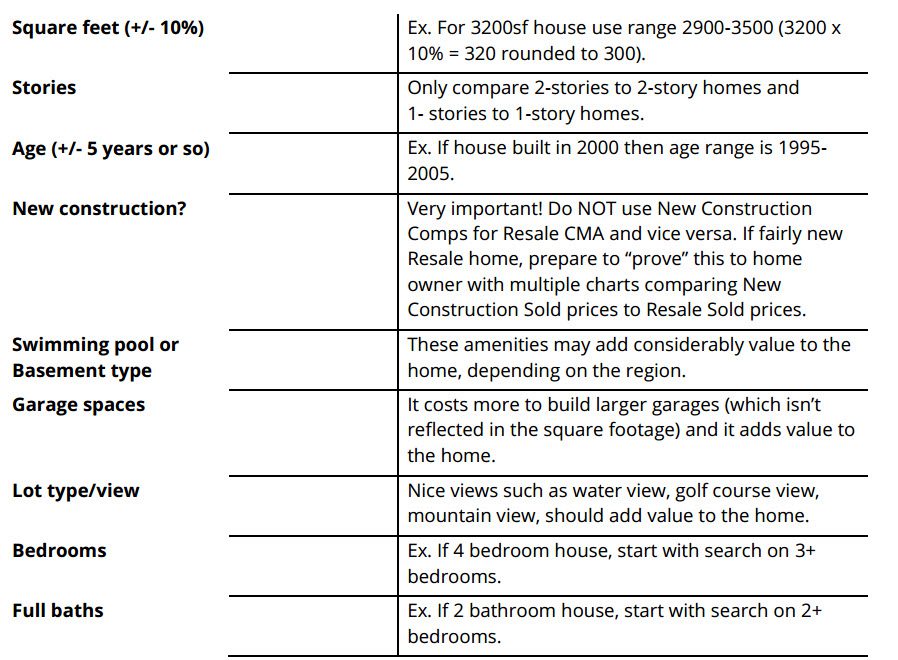
- Set your initial search for Actives, Pendings, and Solds* in the past 6 months by searching within a 1/2−1 mile radius of the house (using a map tool on your MLS), or use the MLS Subdivision field (based on where the property is located). Appraisers tend to use the map radius method. For Rural or Farm and Ranch properties, the radius may be 5 miles.* In a regular market, only use Solds (because those are real sales prices, not list prices. In a very “hot” market, with 2 months or less Inventory, use Pendings and the past 2-3 months of Solds, but place more value on Pendings. In a really slow market you may have to go back 1 year for Sold Comps.
- Modify your MLS search based on the house details (Step 2) to narrow your search to comparable homes.
If there are distressed homes in your area, make sure to exclude those for standard CMAs. There should be a field on your MLS to do this. - If you don’t find enough Comparables using the search criteria in Step 2, then you need to adjust your settings. Use your best judgement and consider the following options:
- Remove variables (number of bedrooms, bathrooms, garage spaces, pools, etc.) until you get the proper number of Comparables.
- Expand your area (but most appraisers won’t include anything more than 1 mile radius unless in rural area).
- Increase the time frame (from 6 mths to 9 mths or 12 mths).
- Look through all the possible Comps (you may have to study photos) and identify the 3 to 5 most similar Comps (more is better), as compared to the subject property. In older neighborhoods, or non-homogenized areas, the condition/appearance of the homes may vary greatly, depending on whether homes have been remodeled or updated. You may have to view photos to find the best Comps. Try to choose Comps that are in similar appearance/updates/finishes as your subject property. Don’t use a luxury or totally remodeled home to compare to a fixer-upper, and visa versa. Don’t use distressed properties when doing a CMA for a non-distressed property.
- Once you find and narrow down your list to the best 3 to 5 Comps available, get a screenshot of the following:
- MLS results page
- Map view of Comp locations
- Stats table for those Comps. These are items that you can email to the Buyer.
- Then place your MLS window side-by-side your CMA spreadsheet (available to Premium Members) on your desktop. Fill in the CMA spreadsheet using the info on the MLS.
- You can Print the finished spreadsheet as a PDF file to send to your client. You can also get a screenshot of the CMA spreadsheet to email the client with the items from Step 5.
Making Price Adjustments Based on Market Conditions
When you are pricing a home for a seller, it’s a good idea to take a few minutes to pull up the five-year Stats from your MLS to help determine what type of real estate market your local area is experiencing.
You will need the Market Classification Worksheets for this process (PREMIUM ACCESS).
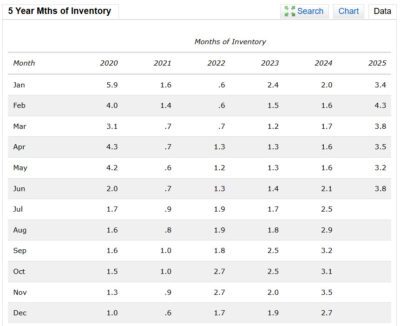
Keep in mind that this is Market Classification method is not a guaranteed method because it looks at PAST data and cannot see FUTURE data.
First, pull up the five-year stats for Months of Inventory, for the subdivision or ZIP Code in which the house is located, on your MLS.
Second, on the five-year data chart, compare the current month’s stat to the preceding 12 months, to determine if the number is increasing, decreasing, or about the same.
Third, circle the box representing the condition (increasing/decreasing) on the table available on the Market Classification Worksheets.
Repeat the process for the other Statistics on the worksheet table.
If you circled mostly boxes in the Slow column, then the market is slow/slowing. Likewise, if you circled mostly boxes in the Hot column, the market is heating up.
Now adjust your CMA values (if necessary) based on the Market Classification.
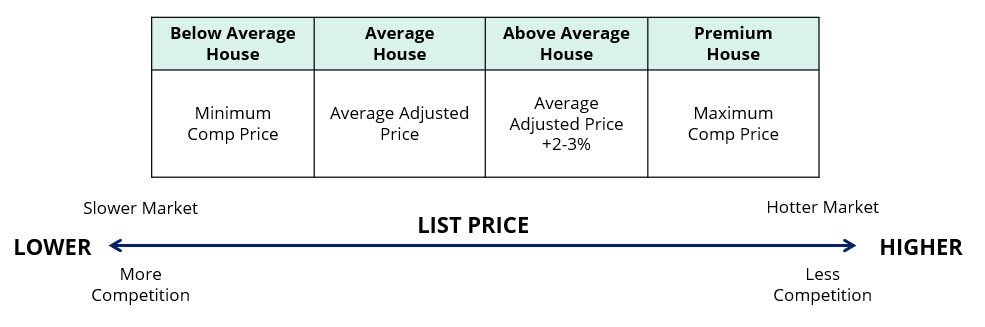
- Shift the home price to the left (lower than CMA price) for lower condition homes in slower markets with high inventory and lots of competition.
- Shift the home price to the right (higher than CMA price) for premium condition homes in hotter markets with low inventory and minimum competition.
Making Price Adjustments Based on House Appearance & Condition
Another way to ensure that your CMA value is accurate is to go through the House Classification process and adjust your CMA value based on the appearance and condition of the house.
Typically, you should only do this for seller clients, but there may be times when you want to do this for buyer clients.
1. Print the House Classification Worksheet and use it based on either:
- Your personal viewing of the property when you showed it to your buyer clients.
- Or your personal viewing of the property when you went on your listing appointment.
2. Circle the correct box (Below Average, Average, Above Average, Premium) for the following variables. This helps you identify the overall appearance & condition of the house as home buyers see it.
- Cosmetic Materials & Finishes
- Curb Appeal
- Flooring
- Furnishings
- Window Coverings
- Deferred Maintenance
- Age of Roof
- Age of HVAC system
- Kitchen
- Floorplan
- Outside Features
- Defects
3. Now “classify” the house based on which column has the most items circled. If most of the boxes are Below Average, then don’t use a top-dollar price for the home. Likewise, if most of the boxes are Premium, then don’t use a bottom-dollar price for the home.
4. Now adjust your CMA price (if necessary) based on the House Classification worksheet.
-
- Shift the home price to the left (lower than CMA price) for lower condition homes in slower markets with high inventory and lots of competition.
- Shift the home price to the right (higher than CMA price) for premium condition homes in hotter markets with low inventory and minimum competition.